Many thirty-day plans quietly assume that a gym owner has unlimited ideas, camera time, editing help, approvals, and lead-response capacity. The calendar looks productive while the team burns out or publishes repetitive clips.
A useful 30-day short-form video system sizes output to the gym’s real production capacity, answers one verified prospect question per video, batches preparation and recording, and reviews retention and qualified actions before repeating the format. Daily publishing is not a requirement.
Start with the prospect-question content strategy, then use this production system for questions that benefit from demonstration, place, voice, or personality.
Calculate capacity before choosing frequency
Estimate one month’s available time:
| Work | Minutes per video | Who owns it |
|---|---|---|
| Question selection and fact check | 8 | Content owner and reviewer |
| Hook and one-point outline | 7 | Speaker or editor |
| Setup and recording allocation | 10 | Speaker and camera operator |
| Edit, captions, and thumbnail | 25 | Editor |
| Approval and correction | 8 | Factual owner |
| Publish and link check | 5 | Publisher |
| Comment and enquiry follow-up | 12 | Front desk or sales owner |
In this fictional planning example, one video consumes about 75 allocated minutes across several people. If the team can protect six hours, five polished videos may be realistic. This is not an industry benchmark. Replace every number with observed production time.
Do not schedule 30 videos because the calendar has 30 days. Schedule what the gym can verify, publish, and support.
Build four useful video lanes
Choose lanes tied to prospect decisions:
- Question answer: one repeated question, answered directly.
- Demonstration: show a process, space, route, or safe setup that words alone cannot explain.
- Proof with boundaries: show current equipment, timetable, coaching process, or a properly consented experience.
- Local context: explain arrival, peak-time reality, weather access, nearby landmarks, or who a service fits.
Avoid a fifth lane called “motivation” unless it contains an original, useful point. A generic quote over stock footage does not demonstrate gym expertise.
Use a one-question script
Keep the script compact:
- Question: say the real prospect question.
- Direct answer: give the conclusion in one sentence.
- Context: explain when the answer changes.
- Proof: show or name the current fact.
- Boundary: state what the video cannot promise.
- Next step: point to one relevant page, visit instruction, or enquiry action.
Fictional example:
“Is a trainer available at 7 pm? At our fictional Lake Road gym, a floor coach is scheduled from 6 pm to 9 pm on weekdays, but personal training requires a booking. Here is the difference between floor support and a booked session. Check today’s timetable before travelling.”
That is more useful than “Three reasons our trainers are the best.” It answers a real decision and avoids implying unlimited coaching.
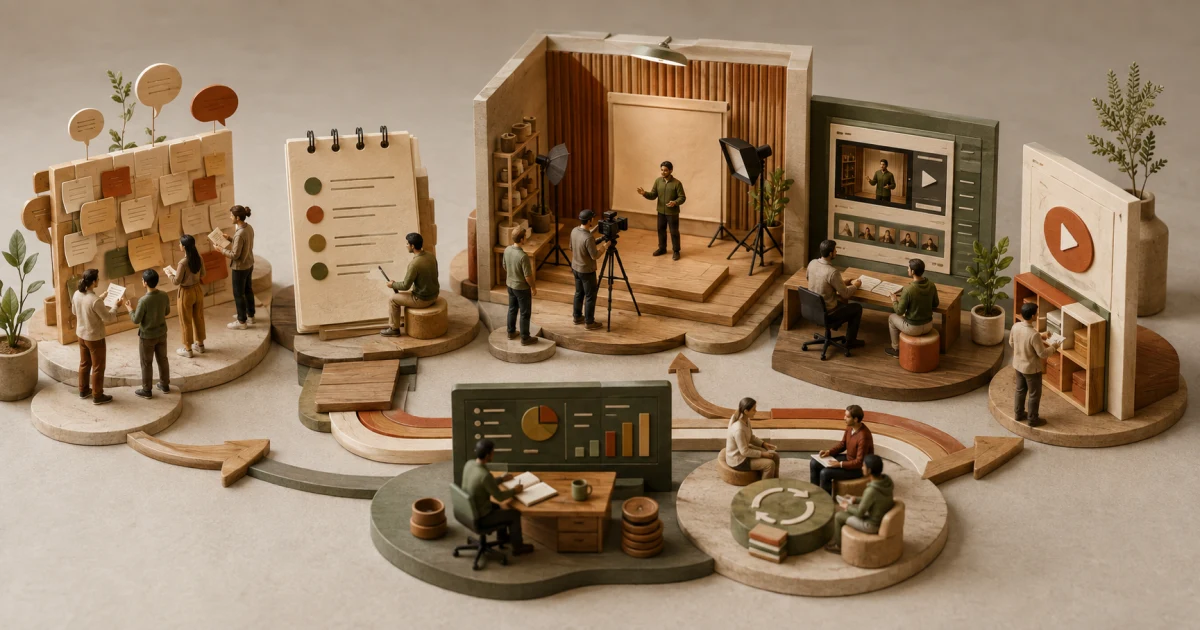
Plan the 30-day production cycle
| Days | Work | Output |
|---|---|---|
| 1 to 3 | Review the question log and select one audience | Ranked shortlist |
| 4 to 6 | Verify facts, locations, claims, permissions, and next steps | Approved briefs |
| 7 to 9 | Write one-question outlines and plan visuals | Recording sheet |
| 10 | Prepare the clean location, audio, lighting, equipment, and consent boundaries | Ready set |
| 11 | Record in one focused block with retakes | Source footage |
| 12 to 18 | Edit, add captions, verify visual facts, and prepare accessible descriptions | Review cuts |
| 19 to 21 | Factual approval and corrections | Approved assets |
| 22 to 29 | Publish at the chosen cadence and handle comments and enquiries | Live learning |
| 30 | Review retention, questions, and qualified actions | Next-cycle decisions |
The publishing row can contain two, five, or eight videos. The system is the controlled cycle, not a magic volume.
Prepare the recording environment
Before recording:
- choose a time that represents the scene you are describing;
- remove member names, screens, whiteboards, health details, and payment information from view;
- establish no-film areas and tell staff what is being recorded;
- obtain appropriate permission for recognisable people;
- check music, footage, graphics, and other assets for necessary rights;
- use a microphone close enough for clear speech;
- frame the main subject for vertical cropping;
- record room tone and a clean opening and ending;
- capture relevant close-ups after the speaking take.
If the point is peak-time atmosphere, filming an empty gym at noon creates the wrong proof. Use the gym tour video plan for an honest facility walkthrough.
Edit for understanding and accessibility
Remove pauses and repetition only when the meaning remains intact. Put the direct answer early. Use on-screen text for the key fact, but do not make text so dense that it competes with the speaker.
Add accurate captions and review names, prices, exercise terms, and local place names manually. Captions are not decorative. They make spoken and relevant non-speech information available when audio cannot be heard. When important visual information is not stated aloud, provide it in the description or a descriptive transcript on the related page.
Do not add a dramatic hook that the video cannot satisfy. “This one mistake is destroying your body” is a health claim and fear device, not a useful introduction.
Use a two-person approval gate
Every video needs:
- a content owner who checks the question and next action;
- a factual owner who checks the service, exercise, safety, price, or policy statement;
- a rights check for people, music, footage, and graphics;
- a privacy check for visible or spoken personal information;
- a final mobile playback with captions on and sound off.
The same person may hold two roles in a small gym, but the checks must still happen.
Measure the right layer
For short video, review:
- feed exposure or impressions;
- the share who chose to view where the platform provides it;
- average view duration and meaningful retention changes;
- saves, shares, and useful questions;
- visits to the linked page;
- qualified enquiries, booked tours, attended tours, and joins with an identifiable path;
- response time and whether the gym could handle the demand.
Do not call a high-view video successful if it attracts the wrong audience, creates unsupported expectations, or overwhelms response capacity. Use the content-to-membership measurement guide for the full path.
Make the next cycle smarter
At day 30, keep a simple decision log:
| Observation | Possible meaning | Next test |
|---|---|---|
| Viewers leave before the answer | Opening may be slow or misleading | State the answer earlier |
| Strong retention, no qualified action | Next step may be weak or audience may be wrong | Clarify fit and destination |
| Repeated comment question | Answer is incomplete or creates a useful spoke | Produce a verified follow-up |
| Good enquiries, poor tour attendance | Handoff is failing after content | Audit booking and reminders |
| Editing consumes most capacity | Format is too complex | Simplify the visual plan |
These are hypotheses, not automatic conclusions. Change one important variable at a time where practical.
Frequently asked questions
Does a gym need to post short videos every day?
No. Choose a cadence the team can research, record, review, publish, and support without lowering accuracy or service quality. Platform guidance does not require daily or weekly uploads, and a forced quota can produce repetitive or weak content.
What should gym owners post in short-form videos?
Answer real prospect questions, demonstrate useful processes or spaces, show current proof with permission, and explain local context. Each video should serve one audience decision and point to one honest next step.
How should a gym measure short-form video performance?
Review feed exposure, viewing choice, retention, watch time, useful engagement, destination visits, qualified enquiries, tours, joins, response capacity, and the limits of attribution. Views alone do not establish business impact.