
Profiles with context
Keep contact details, plan information and membership dates alongside the member’s recorded payment history. A staff handover starts from the same information.
MEMBER MANAGEMENT
Gym Ledger keeps member profiles, membership dates, dues and payment history together, so your front desk can answer questions from one record.
See how it works ↓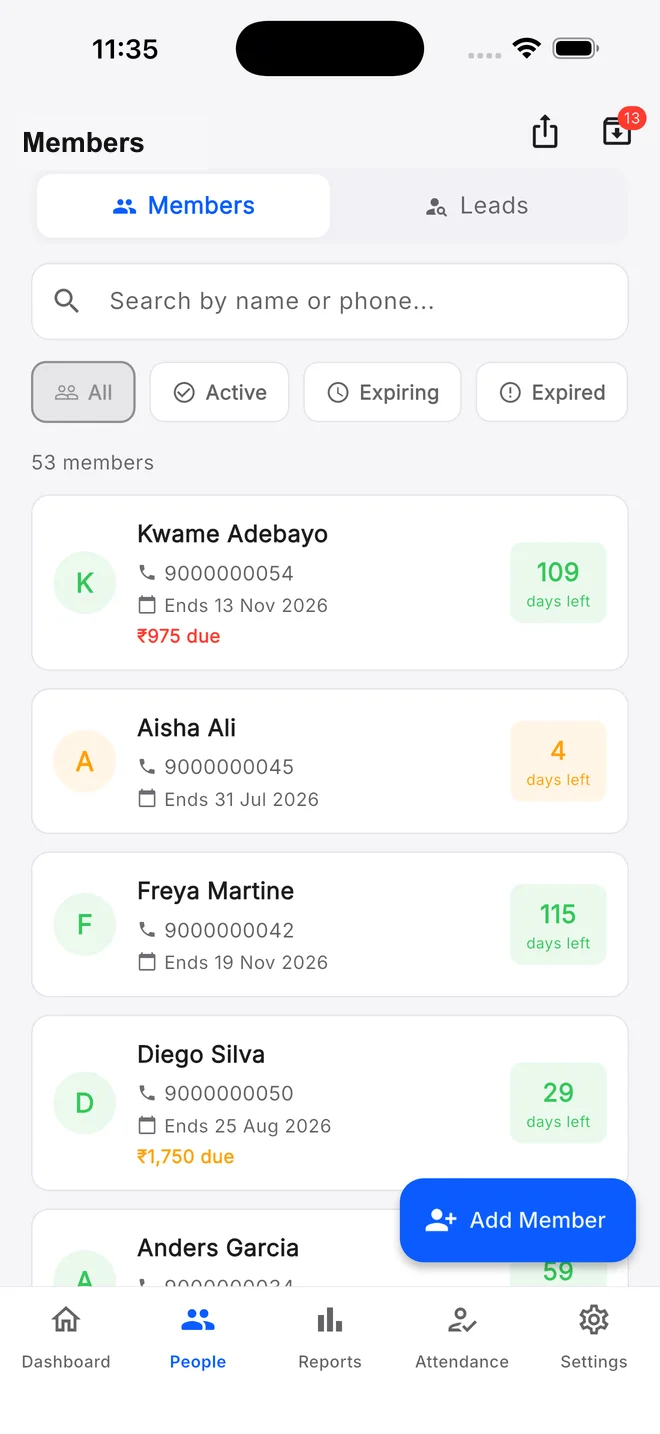
When a member asks about their plan, the answer should not depend on who is at the desk. Find their profile, check the current membership and review recorded payments before making a change. Use status filters to work through the right group instead of checking every name in a register.
Keep contact details, plan information and membership dates alongside the member’s recorded payment history. A staff handover starts from the same information.
Find active, expiring, expired or frozen memberships. Review pending balances separately so an active plan does not hide an unpaid fee.
Freeze and resume a membership when your gym approves a pause. Review the resulting dates so the member knows when their plan will end.
Archive former members when appropriate and export your member list. Moving to a digital system should still leave you with a usable copy of your records.
Enter their contact details and select the membership they are joining. Check the phone number and dates before saving.
Save the plan, fee and payment received. Keep any remaining dues visible rather than treating the full fee as collected.
Use the same member record for later payments, renewals and follow-ups, so the next conversation has context.
A member arrives while the owner is away. The receptionist opens the profile and checks the membership end date and pending balance before discussing a renewal. There is no need to rely on a screenshot from last month.
Owners control staff permissions for member changes. Pro provides mobile access; Max adds the web dashboard. Assisted migration is available after reviewing your existing records and the supported import scope.
Still deciding? Contact Us at +91 93920 47515.
Yes. Assisted data migration starts with a review of your spreadsheet, export or other records. Confirm which records can be moved and review the result with the team; this is not a promise of a universal one-click import.
Yes, when the owner grants the relevant permissions. Member editing, archiving, freezing and other actions have separate access controls.
Yes. Use membership freeze and resume for an approved pause, and review the updated dates with the member.
Explore the mobile app with a 10-day Pro trial, or ask us to walk through your daily work.