
Illustrative AI-generated scene, not a photograph of a Gym Ledger customer.
In this guide
- 1. First, understand the three parties
- 2. How do we connect your gym with Meta?
- 3. Does an official connection remove the risk?
- 4. Who can you message?
- 5. Receipts, reminders and offers are not all the same
- 6. How long does Meta take to approve a template?
- 7. What is the 24-hour reply window?
- 8. How much bulk messaging is allowed?
- 9. What does messaging cost?
- 10. What if a member says “don't message me”?
- 11. Privacy and account security still matter
- 12. Before your first campaign
- 13. If sending fails or Meta restricts the account
- The questions owners ask most
- Official sources and review date
Imagine you run a gym with 300 members. You want to send payment receipts, remind people about expiring memberships, and occasionally announce an offer. You connect WhatsApp to your gym software. Can you now message everyone whenever you want?
No. The connection gives your software a way to send messages. It does not give you permission from every member.
This guide explains those two things separately, then walks through everyday situations. The examples use a fictional business, Sunrise Gym. They are suggested wording, not pre-approved Meta templates.
1. First, understand the three parties
You, the gym owner, decide why someone should receive a message, which members to contact, and whether you have their permission.
Gym Ledger organises gym information and the messaging workflow. Its connection flow uses Meta’s Embedded Signup, and messages are sent through Meta’s WhatsApp Cloud API. An API is simply a way for two software systems to communicate. This is different from a tool that imitates someone clicking Send in WhatsApp Web.
Meta, the company behind WhatsApp, provides that messaging platform. A member receives the message in WhatsApp. Meta still applies its rules and delivery controls. Its documentation describes Embedded Signup as the onboarding flow that lets software providers connect business customers to the platform. Meta’s Embedded Signup documentation
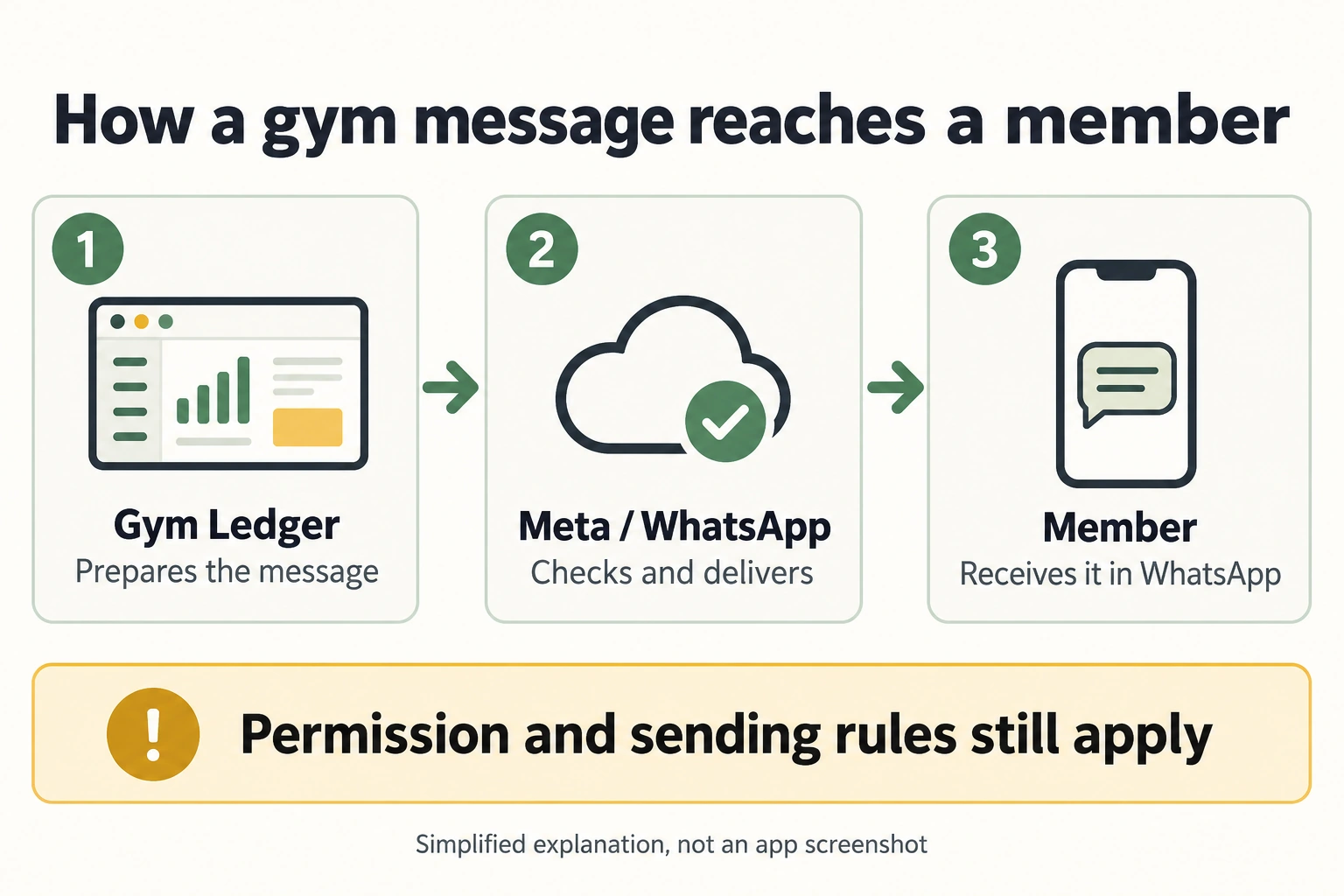
A simplified delivery journey. An accepted send request is not a guarantee of delivery or that the member has read the message.
2. How do we connect your gym with Meta?
The connection for your gym’s own WhatsApp number follows this sequence:
- Start in Gym Ledger’s WhatsApp setup. Choose to connect your gym’s number. If the setup asks you to create a six-digit registration PIN, keep it securely and do not send it to support.
- Complete Meta’s sign-in window. Use the account that has permission to manage the correct business. Your Facebook password belongs in Meta’s genuine sign-in window, not in a message to a support agent.
- Choose the business and WhatsApp account. A business portfolio is Meta’s container for business assets. A WhatsApp Business Account, sometimes shortened to WABA, holds the WhatsApp assets, such as numbers and message templates. Check the business name and number carefully.
- Complete the verification and permissions shown. Meta establishes which business assets you are authorising the connection to use. Review the permissions before accepting them.
- Return to Gym Ledger to finish setup. The connection flow checks that the selected number belongs to the selected WhatsApp account. Connecting a number, selecting it as the sender, enabling automation and having usable templates are separate steps.
This description follows Gym Ledger’s current connection design. The options available depend on the account and supported setup route. Meta’s onboarding material explains business profiles, number verification and templates as separate parts of setup. Meta’s onboarding guide, pages 8 to 10
Already using that number in the WhatsApp Business app? Check the supported connection route before making changes. A route called coexistence can let eligible businesses use the app alongside the platform, but do not assume it is available for your account. Do not delete your existing account or assume chat history will transfer as a routine setup step. Confirm the exact route with support first.
Gym Ledger also distinguishes its company sender, a number provided by Gym Ledger, from your gym’s own number. Check which number is selected before messaging. Connecting your number does not, by itself, switch every message to that number.
3. Does an official connection remove the risk?
It gives you an authorised technical route. It does not make your number ban-proof. WhatsApp’s Business Terms allow it to limit, suspend or terminate accounts for violations. The business remains responsible for activity on its account. WhatsApp Business Terms, “Security Responsibilities” and “Enforcement”
There are several different risks to understand:
| Risk | What it means for a gym | Practical precaution |
|---|---|---|
| Unwanted messages | Members block or report messages they did not expect. | Establish permission and a clear purpose before including someone. |
| Delivery restrictions | An approved campaign may not reach everyone. | Treat delivery results as something to check, not a promise to make. |
| Account access | The wrong business selection or lost administrator access can disrupt operation. | Keep the gym’s business details and authorised access under its control. |
| Existing-number changes | The setup route may affect how an existing number is used. | Confirm the route before changing an account used for daily business. |
| Costs | Campaigns may incur messaging charges. | Review the applicable billing arrangement and budget first. |
The precautions in this table are Gym Ledger’s operating recommendations. Meta explicitly says repeated policy violations can bring increasingly severe messaging restrictions. Meta’s explanation of business messaging controls
Business verification, a verified badge, template approval and member permission mean different things. Verification concerns the business; template approval concerns a message format; member permission concerns the person receiving it. None is a guarantee against restrictions.
4. Who can you message?
Meta’s policy requires that recipients have supplied their number and given permission to receive subsequent messages. Simply importing a spreadsheet does not establish permission. WhatsApp Business Messaging Policy, section 1
For example, a member may give their number so reception can identify their membership. That is not a clear conversation about offers. An old enquiry list also tells you little about what each person agreed to receive.
Meta’s current marketing guide says a separate WhatsApp-specific opt-in is no longer required. It still calls for advance permission to receive messages from the named business and recommends explicit permission for promotions. Meta’s marketing guide, pages 19 to 22
Our recommended signup wording makes the channel and purpose clear:
Membership updates: “I agree to receive WhatsApp messages from Sunrise Gym about my membership, payments and bookings.”
Optional offers: “I would also like WhatsApp offers and announcements from Sunrise Gym.”
Let the member choose. Keep a record of the wording shown, their choice, the date and how permission was obtained. For a paper form, record the relevant choice accurately. Do not tell staff to tick consent for everyone just to finish an import.
The owner’s declaration during software setup means the owner is confirming that permission exists. It is not a substitute for the member making that choice.
5. Receipts, reminders and offers are not all the same
A template is a message format reviewed by Meta. It can include approved text and spaces for details such as the member’s name or a date. Template approval concerns that format; it does not approve your entire recipient list.
| Example from Sunrise Gym | How to think about it |
|---|---|
| “We received your membership payment. Your receipt is available.” | A transaction update, potentially suitable for a utility template. |
| “Your current membership ends on 30 September.” | An account update; exact wording and context still matter. |
| “Renew this week and get 20% off.” | A promotional offer, which belongs in marketing. |
| “Your payment is received. Upgrade today for a discount.” | Contains a promotion. Do not assume calling it a receipt makes it utility. |
Utility messages concern a specific transaction or service; marketing messages promote offers or engagement. These examples illustrate intent, not a prediction of Meta’s final classification. Meta on utility messages, Meta on marketing messages
Authentication messages, such as verification codes, are another category. Most owners reading this guide will be deciding between service updates and promotions. Use a template only for its designated purpose and confirm that it is approved and usable. WhatsApp Business Messaging Policy, section 2
6. How long does Meta take to approve a template?
Meta says an approval decision can take up to 24 hours after submission. This is a review timeframe, not a guarantee that Meta will approve the wording. Meta’s template review documentation, updated 17 June 2026
The sequence is saved draft → submitted to Meta → review decision → usable in your account. Uploading an image or saving text is not the same as successful submission. Gym Ledger does not decide Meta’s result.
| Status | What you should understand |
|---|---|
| Draft or submission failed | Meta may not have received a review request yet. Resolve submission first. |
| Pending / in review | Wait for Meta’s decision. Do not treat this as approval. |
| Approved / Active - Quality pending | Meta has approved the template; “quality pending” means its quality rating is not established yet. Other sending checks still apply. |
| Rejected | Read the reason, correct and resubmit, or appeal where appropriate. |
Our planning advice: submit at least a day before the intended campaign, with extra time for corrections. If it remains pending beyond 24 hours, check the exact account and template in WhatsApp Manager and ask support to investigate. Do not keep making duplicates or assume that waiting longer makes it approved. This review clock is separate from the 24-hour reply window below.
7. What is the 24-hour reply window?
When a member messages your business, a 24-hour customer service window opens. Each new message from that member restarts the clock. Ordinary replies are allowed within that window; outside it, an approved template is required. Meta on service messages, WhatsApp Business Messaging Policy, section 2
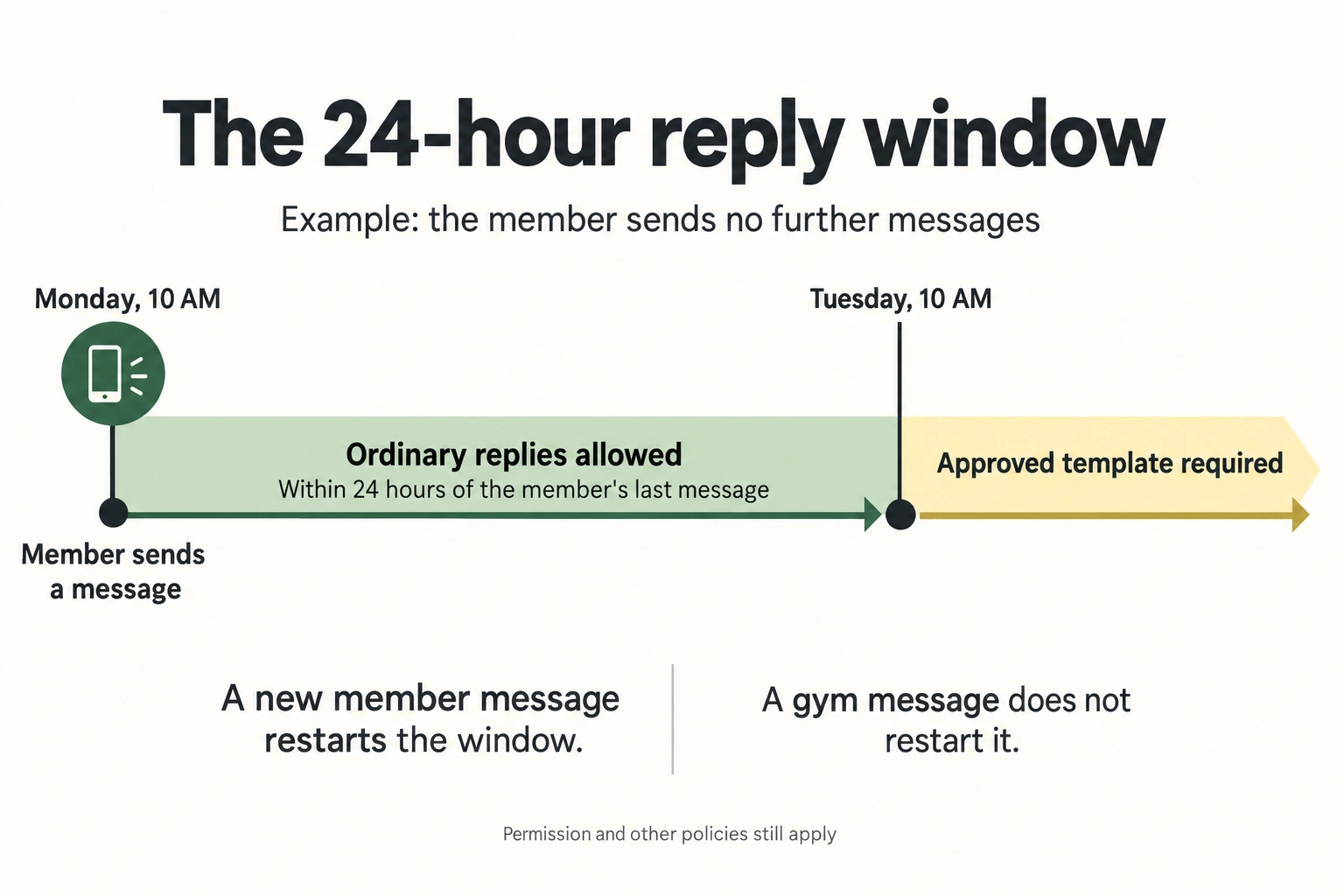
The clock follows the member’s last message. Sending a reminder from the gym does not extend the window.
Suppose Kavya asks about a class at 10 AM on Monday. Reception replies that afternoon. If Kavya sends nothing else, an ordinary follow-up on Tuesday evening is outside the window. If she instead replies at 6 PM on Monday, that new message starts a fresh 24 hours.
This explains a platform rule. It does not mean every Gym Ledger screen provides a free-text WhatsApp inbox. A reply about a class is also not an invitation to start unrelated promotional campaigns.
8. How much bulk messaging is allowed?
Bulk messaging means sending a campaign to many recipients. The list size alone does not tell you whether that campaign is appropriate or deliverable.
Business allowance: this counts unique recipients reached outside their customer service windows during a moving 24-hour period. “Unique” means distinct phone numbers; “moving” means the previous 24 hours, not a reset at midnight. Meta sets the allowance at the business portfolio level, shared by its numbers. Meta’s current messaging limits
New portfolios start at 250. The documented higher levels are 2,000, 10,000, 100,000 and unlimited, subject to Meta’s eligibility and scaling checks. A newly added number shares its portfolio’s allowance. These are platform tiers, not a statement of your gym’s present entitlement. Check WhatsApp Manager → Account tools → Messaging limits. Meta’s current messaging limits
For example, two numbers in one portfolio do not each get a separate 250 allowance if that portfolio’s total is 250. Adding another number does not double it. “Unlimited” at this tier level still does not remove consent, quality or other delivery controls.
Recipient marketing controls: Meta also limits marketing messages people can receive. A business may have capacity available while a particular recipient still does not receive its promotion. Meta’s explanation of recipient limits
Quality controls: Poor feedback can lead to template pausing or disabling. Account and template status therefore matter as well as the allowance. Meta’s marketing guide, pages 9 to 11
Illustration, not an account promise: if a dashboard shows 250 customers per 24 hours, do not schedule an 800-person campaign on the assumption that all 800 can immediately receive it. Ask what allowance is available and how the campaign will be handled.
There is no number in this guide that guarantees freedom from complaints or restrictions. A small unwanted campaign can still be a bad experience. Paying for more credits does not create permission from recipients.
9. What does messaging cost?
Meta’s platform pricing is based on delivered messages, with rates depending on the recipient’s market and message category. Its pricing page also describes free service messages and other exceptions. An approved message is not automatically a free message. Meta’s current pricing
Before sending, check which sender and billing arrangement your gym is using. A Gym Ledger subscription, any messaging credits and Meta’s charges should not be treated as interchangeable. Confirm the current charges shown for your arrangement instead of relying on a fixed rupee rate copied from an old article.
Our budget worksheet is simple: estimate the chargeable deliveries in each category, apply the relevant rates, then add any separate provider charges or taxes that apply. It is an estimate, not a billing guarantee.
10. What if a member says “don’t message me”?
Treat it as a request to stop, regardless of how it arrives. Meta requires businesses to honour opt-outs received both on and off WhatsApp. A reception conversation or phone call counts; the member does not have to use one special keyword. WhatsApp Business Messaging Policy, section 1
Imagine Kavya comes to reception and says, “Please don’t send me WhatsApp messages.” Our recommended staff procedure is:
- Acknowledge the request there and then. “Understood. We’ll stop WhatsApp messages to your number.” Do not send a new WhatsApp promotion to acknowledge it.
- Identify the correct number. Record which number and whether she requested all messages or only offers. If she said all WhatsApp messages, do not silently keep reminders enabled.
- Record and apply the sending block. A note in a diary is not enough if automated reminders continue. The sending system needs an actual exclusion for that recipient.
- Check scheduled messages and other sending tools. The same request must be reflected wherever staff send messages. Do not move the person to another number or campaign to get around it.
- Resume only after a fresh, clear request to receive messages. Keep evidence of that new choice. A renewal payment on its own does not tell staff that the member changed their mind.
These steps are our recommended operating procedure. They are not instructions for a control that has already been verified in every Gym Ledger release.
Current Gym Ledger limitation: the source reviewed for this guide includes backend opt-out checks, but no per-member owner control was found for recording an in-person request. Do not assume a note, removal from one campaign or changing a notification setting stops every WhatsApp send. Contact Gym Ledger support to have the request applied and verified. Until the affected recipient is confirmed excluded, pause the relevant sending activity. If there is no reliable way to exclude one person, pause automation and campaigns that could reach them.
Automatic keyword handling is also limited. A reply consisting of STOP can follow the automatic opt-out route when the incoming-message connection is correctly configured. A sentence such as “Don’t send me WhatsApp messages” must not be assumed to trigger that same detection. The gym’s obligation still applies.
Do not delete a member’s membership or payment history just to stop messages. Messaging preference and membership administration are different concerns. Software also cannot recall a message already handed off for delivery or prevent staff independently typing in another app.
11. Privacy and account security still matter
Only authorised people should use the business account. Protect credentials and provide the necessary privacy notices and permissions for customer data. WhatsApp’s terms place these responsibilities on the business. WhatsApp Business Terms, “Compliance with Laws and Regulations” and “Security Responsibilities”
Meta’s messaging policy also restricts sensitive identifiers and certain regulated goods or services. Do not assume that every product a gym sells can be promoted through WhatsApp. WhatsApp Business Messaging Policy, sections 3 to 5
Our practical advice: keep routine reminders short, avoid including unnecessary health details or identity documents, and never ask members to send a full payment-card number in chat. Choose the right channel for a sensitive conversation.
Connecting software introduces authorised processing of business messages; do not describe it as “nobody except the member can access anything.” Read the applicable privacy and processing terms for the services used. WhatsApp Business Data Processing Terms
12. Before your first campaign
Use this short working checklist:
- Audience: Can we explain why each recipient expects this message?
- Purpose: Is this an account update, a reply or an offer?
- Opt-outs: Have reception requests and message replies been applied to actual sending exclusions?
- Sender: Is the selected business and number the one members expect?
- Template: Is the chosen template approved and appropriate for this message?
- Capacity and budget: Have we checked the current allowance, status and charges?
- Follow-through: Who will handle replies, opt-outs and delivery problems?
For an initial campaign, our recommendation is a small, relevant audience with clear permission. Inspect the results and questions before expanding. This is a way to learn; it is not a technique for bypassing Meta’s limits.
13. If sending fails or Meta restricts the account
First identify what actually happened: one undelivered message, an unusable template, an exhausted allowance or an account restriction are different problems. Preserve the displayed reason, the time and the affected template or campaign. Avoid repeatedly sending the same campaign while the cause is unknown.
Review the audience, consent records and opt-out handling. If the account has been restricted, use Meta’s applicable review or complaint process. Reinstatement is Meta’s decision. Its terms also prohibit creating another business account after termination without its express permission. WhatsApp Business Terms, “Enforcement” and “Complaints”
The questions owners ask most
“Can I message everyone in my member list?”
Check their permission and preferences first. The list is your membership record, not a blanket approval for every campaign. See sections 4 and 10.
“Can my account be restricted even though the link is official?”
Yes. Official connectivity does not remove messaging rules or enforcement. See section 3.
“Does linking Meta automatically send a campaign?”
No. Gym Ledger’s connection design keeps connection, sender selection and sending readiness separate. Review the settings after onboarding.
“Does turning off app notifications stop WhatsApp?”
Do not assume so. Phone notifications and WhatsApp sending are different controls. A WhatsApp request needs a verified WhatsApp exclusion.
“Can I tell a member to type STOP instead of helping them?”
You may explain that option, but you still need to act on the request they already gave you. They should not have to repeat it through a different channel.
“Is this our contract with Meta?”
No. This is an explanatory guide. The applicable WhatsApp terms, policies and your service agreements govern use. This guide does not add an unlimited-send promise, a refund policy or a guarantee of account approval.
Official sources and review date
Links appear beside the relevant guidance so you can read the original context. The principal references are:
- WhatsApp Business Messaging Policy: permission, templates, opt-outs, restricted content and enforcement.
- WhatsApp Business Terms: account responsibilities and the applicable business agreement.
- Meta Embedded Signup documentation: the business connection mechanism.
- Meta’s marketing best-practice guide: permission, relevance, quality and messaging limits.
- Meta’s business messaging controls: recipient controls and enforcement.
- Meta’s pricing page: current message categories, charges and exceptions.
- WhatsApp Business Data Processing Terms: processing of customer data.
- Meta’s template review documentation: the up-to-24-hour decision timeframe and review outcomes.
- Meta’s messaging limits: current portfolio allowances and where to check them.
Reviewed 11 September 2026. Meta’s Business Terms page announces a change effective 23 September 2026. Recheck the applicable terms on or after that date. Older onboarding guides contain historical limits and number-registration instructions; this article does not adopt those figures or tell you to delete an existing WhatsApp account.