India
 Australia
 Bangladesh
 Brazil
 Canada
 Egypt
 Germany
 Indonesia
 Kenya
 Lebanon
 Malaysia
 Mexico
 Nepal
 Nigeria
 Pakistan
 Philippines
 Saudi Arabia
 Singapore
 South Africa
 Sri Lanka
 Thailand
 UAE
 United Kingdom
 United States
 Vietnam
An Export button can produce a spreadsheet that looks reassuring and still leaves you unable to match a payment to a membership. Find that out while the account is working, rather than during a hurried move to another system.
Test a gym software export by opening the files, joining records through stable identifiers, reproducing a few known balances and recording what is missing. An export is usable only for the scope you have actually verified. It is not automatically a full backup or a guarantee that another product can import the data.
For the complete move, including cutover and staff responsibilities, use the gym data migration guide. This article covers the smaller acceptance test that should happen before you depend on an export.
Define what the export must preserve
List the decisions you must be able to make from the files. At minimum, an operational test might need to establish who a membership belongs to, its agreed dates and charge, which receipts belong to it, and the remaining balance.
| Record | Relationship to preserve | Failure that a row count will miss |
|---|---|---|
| Member | Stable member identifier | Two people share a phone number and are treated as one |
| Membership | Membership identifier linked to a member | A renewal is indistinguishable from the previous period |
| Payment | Receipt identifier linked to a membership or charge | Payments exist but cannot be allocated reliably |
| Adjustment | Reference to the affected charge and reason | A discount or correction disappears from the balance |
| Attendance | Member reference and event date/time | Visits remain as numbers with no reliable owner |
This is an acceptance scope, not a demand to export every field. Exclude unnecessary sensitive notes, credentials and unrelated personal information. Restrict access to the files you do need.
Start with a small fixture you can calculate yourself
Use fictional records in a vendor-supported test account. Do not create fake transactions in the live gym books merely to test a feature.
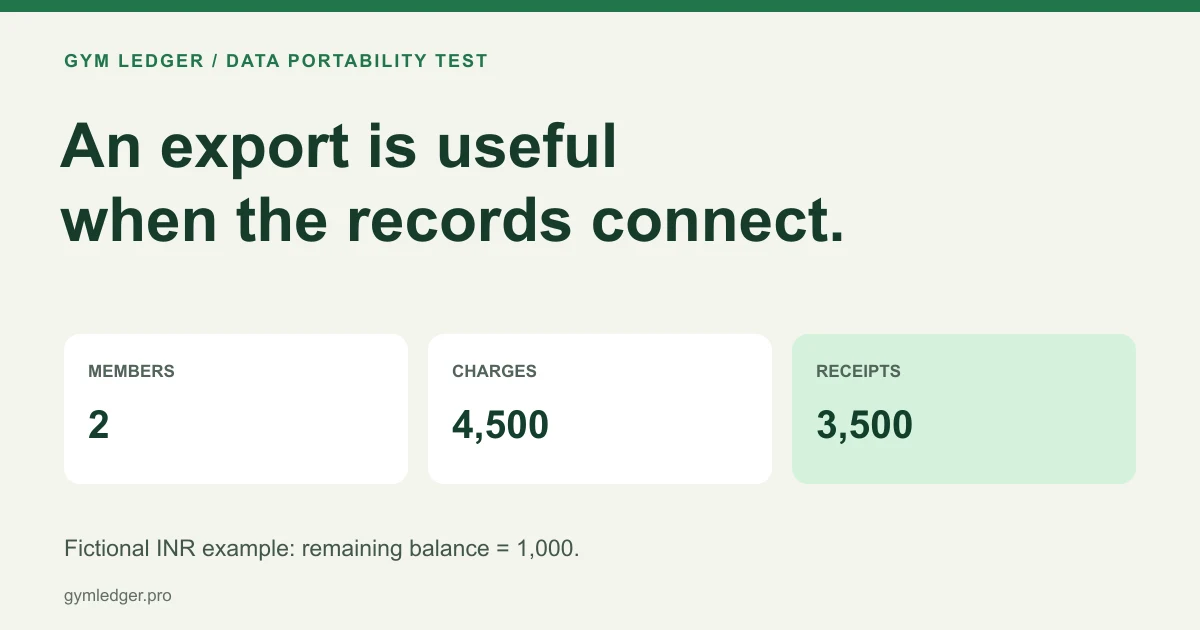
The example below has two memberships, no taxes, no refunds and no adjustments. All amounts are illustrative INR values. It tests relationships and arithmetic, not an accounting policy.
| Member ID | Membership ID | Agreed charge | Receipt amounts | Expected balance |
|---|---|---|---|---|
| DEMO-M101 | DEMO-P101 | 3,000 | 1,000 + 1,000 | 1,000 |
| DEMO-M102 | DEMO-P102 | 1,500 | 1,500 | 0 |
| Total | Two memberships | 4,500 | 3,500 | 1,000 |
The example files are available as members.csv, memberships.csv and payments.csv. These are fictional acceptance fixtures, not Gym Ledger import templates. A vendor may require a different schema.
If you cannot use a test account, select a small authorized sample from the existing system and write down its expected results before exporting. Avoid copying real personal details into a public support ticket or an unrestricted demonstration.
Check identifiers before trusting the totals
Open every file as data. Confirm that identifier columns remain text and that the export has not shortened, reformatted or removed them.
Perform these relationship checks:
- Each member ID is unique in the member file.
- Each membership points to a member that exists.
- Each receipt ID is unique in the payment file.
- Each payment points to the intended membership.
- A second membership for the same person stays separate from the first.
Names alone cannot reliably link tables. Phone numbers may be shared or change, and a member can purchase more than one plan over time. Where an export lacks the necessary relationship field, mark that scope unverified and ask for a supported alternative.
Reproduce the balances outside the application
For this deliberately simple fixture:
DEMO-P101: 3,000 - (1,000 + 1,000) = 1,000 remaining
DEMO-P102: 1,500 - 1,500 = 0 remaining
Total: 4,500 - 3,500 = 1,000 remaining
Compare the exported calculation with the same memberships in the source system. A total of 3,500 in both places does not prove allocation is correct: the payments could still be attached to the wrong people.
For a real export, extend the calculation to the system’s actual discounts, credits, taxes, refunds and opening balances with the accounts owner’s review. Do not silently treat every adjustment as a payment or import old dues as a new sale.
Challenge one failure at a time
Work on a copy of the fixture. Remove one membership row and confirm that its payment becomes an orphan. Duplicate a receipt row and confirm that the receipt-ID check fails. Leave a required date blank and confirm that the validation identifies the row rather than inventing a date.
These checks establish what your acceptance process catches. They do not prove that the vendor prevents those failures in production. Save the failed case and the expected diagnostic so a later export can be checked the same way.
Save a result another person can inspect
| Acceptance field | What to record |
|---|---|
| Export scope | Tables, date range, statuses, branches and included fields |
| Extraction evidence | Export time, operator, source account and original files |
| Count check | Expected and actual rows for each table |
| Relationship check | Missing IDs, duplicate IDs and unresolved links |
| Money check | Agreed charges, verified receipts and supported balances |
| Limitations | Fields or periods that were unavailable |
| Decision | Accepted for the stated scope, or unresolved with an owner |
Keep the original export unchanged. Make corrections in a separate working copy and retain the reason for each change. Store both in an approved restricted location under the gym’s retention policy.
Ask exit questions while you still have access
Confirm which exports are available on the actual plan, whether there is a fee, how long access continues after cancellation and how historical documents are supplied. Get the vendor’s current answer in writing. Do not assume a cancellation window from another product applies to yours.
Gym Ledger’s existing assisted migration page explains its migration route. These example files do not promise a self-service importer, a complete system restore or export coverage that has not been demonstrated. Test the specific records and workflows you need before deciding a move is ready.
Frequently asked questions
Is a gym member-list export enough to change software?
Only if that list covers the agreed migration scope. Memberships, receipts, balances, attendance and other required records may need separate files with stable identifiers that preserve their relationships.
How do I know whether exported payment totals are correct?
Compare receipt counts and amounts with the source, then reproduce balances for individual memberships. Matching a grand total alone does not establish that payments belong to the right records.
Is a CSV export the same as a full software backup?
No. A CSV contains the fields exported into that file. It may omit relationships, attachments, history or settings, and it does not prove the original system can be restored.
Are the example CSV files ready to import into Gym Ledger?
No. They are fictional fixtures for checking identifiers, relationships and balances. Use the supported migration process and its required template for an actual import.