The member paid by UPI. The screenshot is in WhatsApp, the amount is in the bank app, the expiry date is in a register, and the person who knows whether a balance is still due has gone home. Nothing here takes an hour. Together, it can take the whole evening.
Gym management software saves time by keeping member details, payments, renewals, attendance, and follow-ups in one connected record. It does not make every task disappear. It removes repeated entry, manual searching, and the need to rebuild the same answer from several places.
The short answer: A gym saves time when information is entered once and reused everywhere. Record a payment against the member, and the balance, receipt, collection total, and payment history should update from that one action.
This guide shows where the time actually goes, which tasks software can simplify, and how to calculate whether a system is genuinely helping your gym.
Where gym administration quietly takes over the day
Most owners do not sit down for a four-hour block called administration. The work arrives in fragments:
- Check whether a membership is active while someone waits at reception.
- Search a bank statement for a UPI payment.
- Rewrite an expiry date after a renewal.
- Ask a staff member who followed up with a lead.
- Count register entries to estimate attendance.
- Copy monthly collections into a spreadsheet.
Each interruption looks small. The real cost is switching attention away from the floor, the member in front of you, or the sale you were trying to close.
The right test for gym management automation is therefore not the number of features on a pricing page. It is how many times the same information must be found, copied, or confirmed.
Seven tasks gym management software can simplify
1. Finding a member and understanding their status
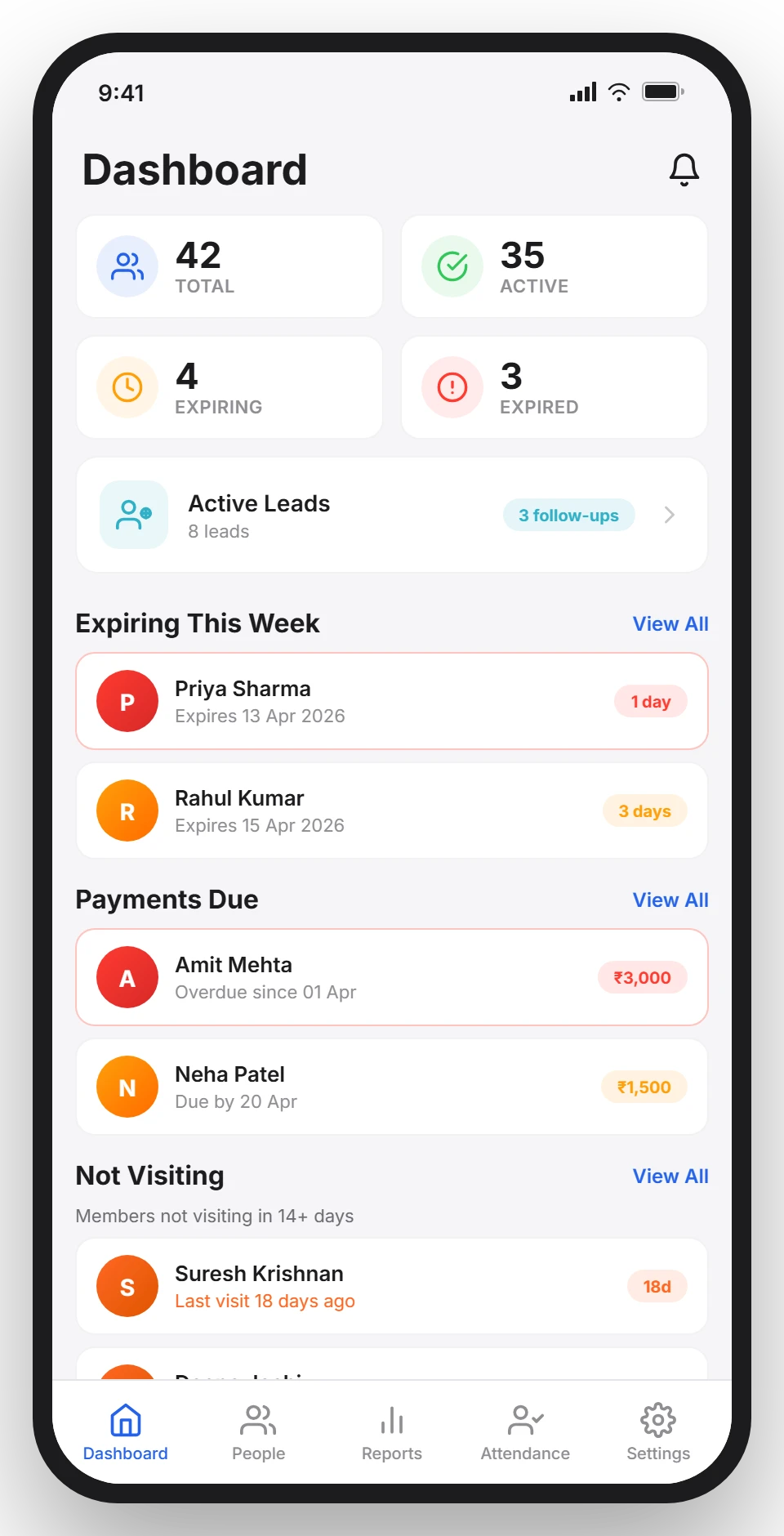
A useful member record answers the front-desk questions immediately: Is the plan active? When does it expire? Is any amount still due? When did the member last visit?
Without that record, staff search paper pages, spreadsheet rows, and message threads. With it, the answer comes from one profile. That is the foundation of effective gym member management, because every later workflow depends on the member record being correct.
2. Recording payments without rebuilding balances
Receiving money is quick. Matching it to the correct member is where the work begins.
Good gym payment tracking records the method, amount, date, plan, discount, and any pending balance together. A partial UPI payment should not become a note that someone must interpret later. It should update the amount due immediately and remain visible in the member’s payment history.
The time saving comes from eliminating reconciliation, not from making the payment itself faster. Read the practical process in our guide to collecting gym fees by UPI.
3. Preparing renewal follow-ups
The slow version of renewal work starts with building a list. Someone checks dates, separates already-renewed members, finds phone numbers, and decides whom to contact first.
Software should prepare that decision for you. An expiring-soon view and a pending-dues view turn follow-up from a research task into an action. The owner or staff member can open the list and start contacting people.
That difference matters because a reminder sent while the member is still engaged is more useful than a perfect message sent after the plan has already expired.
4. Tracking attendance without counting a register
A paper register can show that someone signed in. It cannot quickly show visit frequency, inactive members, or peak hours.
Digital attendance records each visit against the correct member, whether the gym uses QR, manual check-in, or supported biometric access. The record can then answer a more valuable question: who has stopped coming?
Attendance software saves time twice. It reduces daily entry work and removes the later task of converting handwritten visits into usable information. Our QR, biometric, and register comparison explains the trade-offs.
5. Keeping lead follow-ups visible
A new enquiry often starts as a call, Instagram message, walk-in, or WhatsApp chat. If the next follow-up exists only in someone’s memory, the gym has to keep asking what happened.
A simple lead record should hold the source, notes, trial status, and next action. Staff can see today’s follow-ups without reading old conversations, and the owner can see which enquiries are moving and which have gone quiet.
6. Preparing routine reports
Monthly reporting becomes slow when the numbers have to be reconstructed. Collections come from a payment book, attendance from a register, expenses from receipts, and membership status from another sheet.
When daily records already live in one system, the report is a view of existing data rather than a separate project. The important distinction is that software cannot repair information that was never entered correctly. It can only stop you from calculating the same number again.
7. Answering staff questions without sharing one login
One shared login seems convenient until nobody knows who changed a payment or archived a member. Giving each staff member an account with the permissions needed for their job reduces interruptions and keeps accountability intact.
The receptionist can record attendance without seeing financial reports. A manager can review operations without changing owner-only settings. That is faster than routing every normal action through the owner, and safer than giving everyone unrestricted access. See the suggested starting roles in our staff permissions guide.
What software should not automate
Not every human task is wasted time. A system can identify an inactive member, but it cannot understand why that person stopped attending. It can prepare a renewal message, but it should not turn a genuine member relationship into spam.
Keep people responsible for:
- Sensitive conversations about health, injury, or money.
- Deciding when a discount is justified.
- Coaching staff and reviewing unusual changes.
- Checking that records reflect what actually happened.
- Choosing the right follow-up for the member.
The useful division is simple: software prepares the context, and a person makes the judgement.
How to calculate the time your gym could save
Do not rely on a vendor’s claim about hours saved. Measure your own workflow for one normal week.
| Repeated task | Times per week | Minutes each | Weekly time |
|---|---|---|---|
| Find member status | |||
| Match and record payments | |||
| Prepare renewal list | |||
| Count or review attendance | |||
| Build reports | |||
| Answer routine staff questions |
Multiply frequency by minutes, then add the weekly total. Run the same check after two weeks with the new system. This gives you a defensible result based on your gym, not a marketing promise.
Also watch for displaced work. If saving five minutes at the desk creates ten minutes of cleanup later, the task was moved rather than simplified.
A practical test before you choose
During a trial, use real examples and time these five actions:
- Find an expiring member with a pending balance.
- Record a partial UPI payment and check the remaining due.
- Identify members who have not visited recently.
- Find today’s lead follow-ups.
- Export a monthly report.
If the demo needs a long explanation, daily use will not become easier when the salesperson leaves. The best gym software for a small gym is the one your staff can use correctly during a busy shift.
Gym Ledger is designed around this narrow set of recurring jobs: members, payments, renewals, attendance, leads, staff, and reports. It does not run class booking or calculate profit, because adding unrelated workflows would not make these core jobs faster. You can compare what it includes before starting a trial.
Frequently asked questions
Does gym management software really save time?
Yes, when it keeps member details, payments, renewals, attendance, and follow-ups in one connected record. The biggest saving comes from entering information once instead of searching for it and copying it across registers, spreadsheets, bank statements, and messages.
Which gym tasks can software automate?
Gym software can prepare expiry lists, calculate pending balances, generate payment histories and receipts, record attendance, surface inactive members, organize lead follow-ups, and build routine reports from data already entered by the gym.
How should I measure the time saved by gym software?
Track how often your team performs each repeated admin task and how many minutes it takes for one normal week. Repeat the same measurement after two weeks with the software, and compare the totals without counting work that was merely moved elsewhere.
Can a small gym benefit from management software?
Yes. A small gym benefits when the owner is personally carrying member status, dues, renewals, and follow-ups in memory. The value comes from reducing repeated work and missed actions, not from having a large number of members.